What AI can and cannot do for your store
| Step | AI helps | You still decide |
|---|---|---|
| Product idea | Lists ideas, questions, risks | If you can source it and make a margin |
| Store name | Dozens of names in seconds | If it is easy to say and free on social media |
| Sections and design | Builds a section from one sentence | What goes on the product page first |
| Product texts | A first draft in your tone | Every fact: size, material, delivery time |
| Translation | The whole store in another language | Words your customers really use |
| Photos | Ideas for angles and backgrounds | Real photos of the real product |
1. Use AI to test your product idea
Ask a chatbot to argue against your idea, not to praise it. You want the questions a buyer will ask before ordering.
I want to sell [product] online in [country] for about [price]. List the 10 questions a buyer asks before ordering, the 5 reasons parcels of this product get refused or returned, and 3 ways to show the product is worth the price.
Then check the money yourself with the profit calculator: AI does not know your supplier price, your delivery fee or your refusal rate.
2. Find a name
Try the store name generator, or ask a chatbot for names that are short, easy to spell in your customers’ language and not tied to one product. Check the name on Instagram and TikTok before you fall in love with it.
3. Create the store and pick a theme
On CODOS Store you sign up with your email, choose your country and currency, and build privately: three days free, then $1 for the first 14 days. Pick a theme close to your trade — every theme is included, no extra fee — and add your logo and colours.
Add your products before you generate anything. The AI uses your real catalogue, so sections built after your products are in place show the right pictures and prices.
4. Build your pages with AI sections
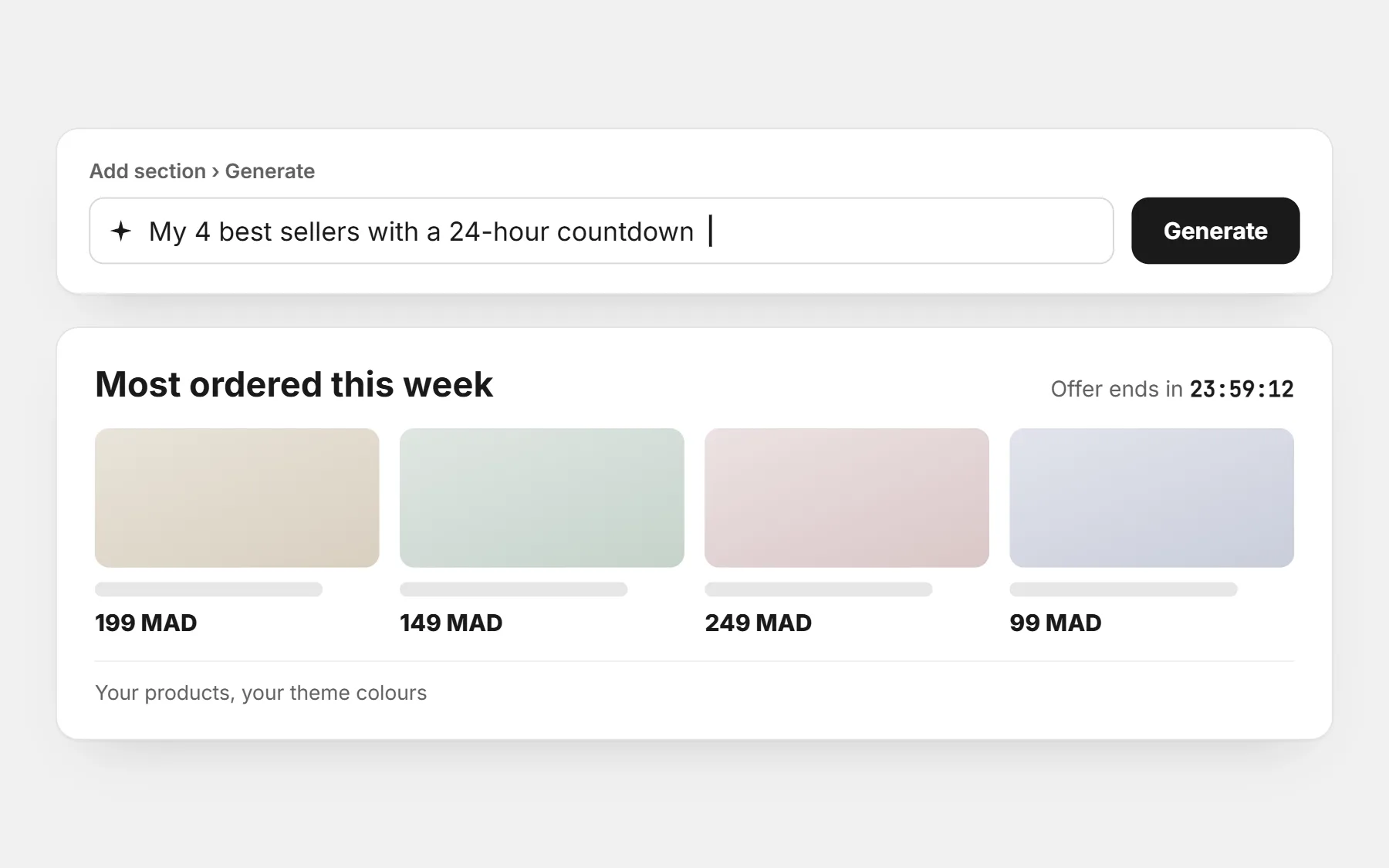
In the editor, open Add section › Generate and describe what you want in one sentence, in English, French or Arabic. The section appears in your theme’s colours, with your products, and you edit it like any other section. You can change it in words (“make the title bigger”) and undo any change. See AI sections.
A section with my 4 best sellers, a short title “Most ordered this week” and a 24-hour countdown.
Three reasons to buy [product], each with an icon and one short sentence: delivery in 48 hours, pay on delivery, exchange within 7 days.
A before / after section for [product] with two pictures side by side and one sentence under each.
Twenty more in AI prompts for store sections.
5. Write product texts with AI, then check every fact
CODOS Store does not write product descriptions for you. Any chatbot can write a good first draft if you give it the facts. Paste the result in the product, then read it as a customer would.
Write a product description for [product] for buyers in [country]. Facts: [size, material, what is in the box, delivery time, payment on delivery]. Start with the main benefit in one sentence, then 4 short bullet points, then one sentence about delivery. Plain words, no exaggeration, no medical or miracle claims.
- Remove every claim you cannot prove.
- Check sizes, quantities and delivery times against reality.
- Keep the words your customers use — dialect is fine if they write in it.
More in product descriptions that sell.
6. Translate the store with AI
Selling in Arabic and French, or to a second country? The Language & Currency app translates products, collections and pages with AI in one click, and shoppers switch language and currency from a small button. Read the translation once: product names and dialect words often need a human touch.
7. The checks AI cannot do for you
- Order from your own phone, on mobile data, and time it.
- Check the delivery fee shows before the order form.
- Make sure every picture is the real product.
- Read the policies: delivery, returns, contact. AI drafts them; you must be able to keep them.
- Ask a friend to order without help and watch where they hesitate.
8. Open, and bring the first visitors
AI can draft your first posts and ad texts too. The store only earns once people arrive: see how to get your first order.
Questions people ask first
Can AI build a whole online store for me?
Not a store that sells. AI can build sections and draft texts fast, but the product, the price, the photos and the promises have to be yours and true. On CODOS Store, AI builds sections one at a time inside your theme, which keeps every page fast and editable.
Is the AI free?
AI sections and AI translation are part of the store plan, with a monthly number of AI sections per plan. There is no separate AI subscription.
Does Google penalise AI-written text?
Google judges whether a page is useful, not who typed it. A generic copy-pasted description helps no one; a checked text with real facts and your own photos does.
Which chatbot should I use for texts?
Any well-known one works. What matters is giving it real facts and checking the answer.